What the camera sees
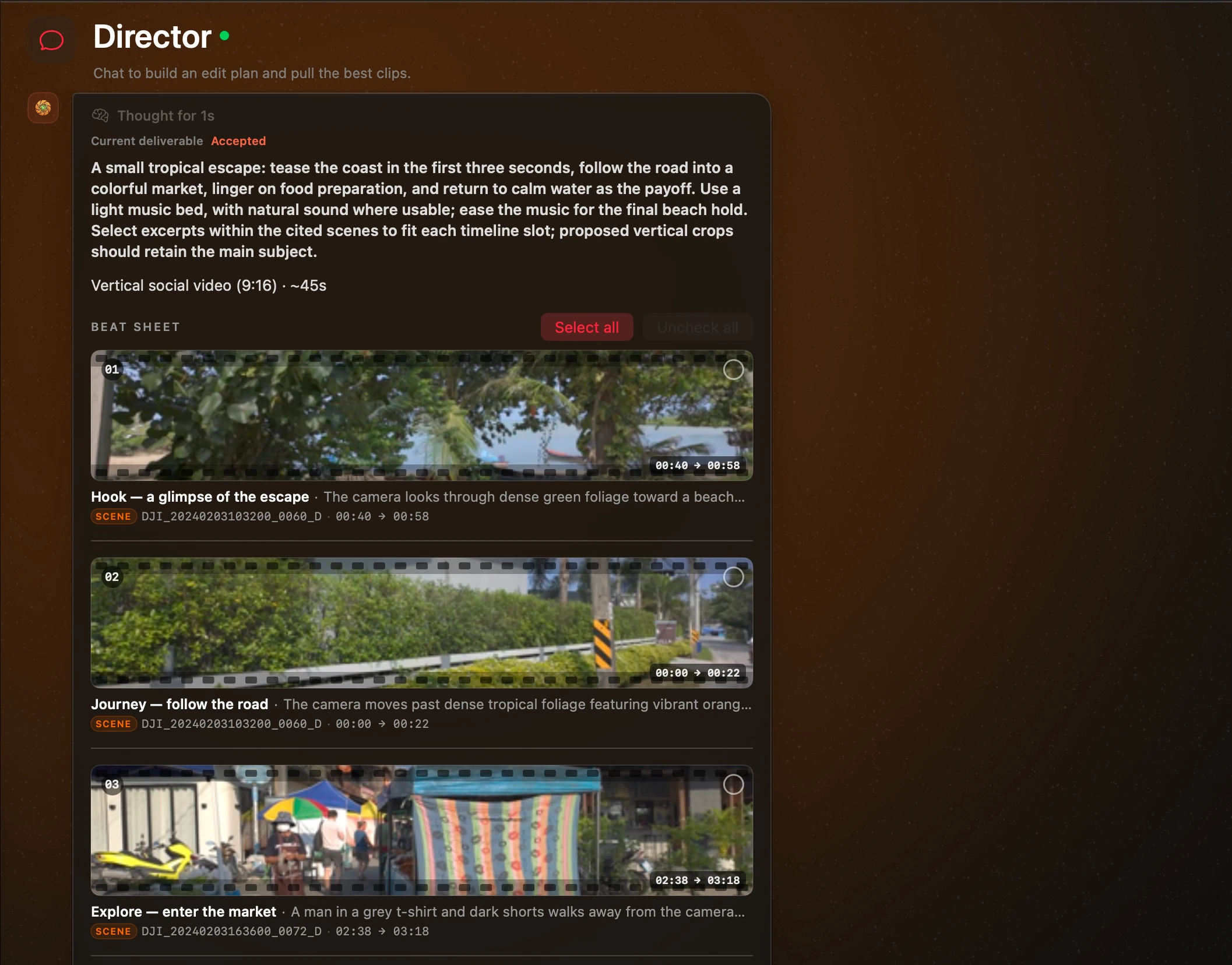
Look for a subject, a setting or an action. Visual embeddings help connect your words to the footage, alongside the clip and scene descriptions.
Release notes
Try experimental on-device search across video, audio and text. The latest beta adds a staged V2 pipeline, clearer processing progress, automatic update checks and an empty scanner ready for the folders you choose.
RELEASED
Mac app v0.13.14 · captured
V2 pipeline · Experimental
A clip holds more than a picture. SightRoll’s V2 pipeline uses EmbeddingGemma 2 to index video, audio and text on your Mac, then finds scenes and describes selected frames.
Explore footage searchLook for a subject, a setting or an action. Visual embeddings help connect your words to the footage, alongside the clip and scene descriptions.
The experimental V2 pipeline also indexes audio cues. Look for a sound or atmosphere, even when it is not captured in a visual description.
Ask in plain language. Existing clip and scene descriptions are indexed in the same embedding family, so your earlier analysis remains useful.
One stage at a time, across your selected clips.
Choose V2 in the scanner before starting analysis. V1 remains available. Audio matches are experimental; speech transcription and exact spoken-line search are not available. Scene timing and descriptions still need your review.
9 feature areas across the releases since v0.7.3, now through v0.15.9-beta: multimodal indexing, your own agents, per-chat AI, cloud scene export and a clearer workspace. Models prepare when you need them.
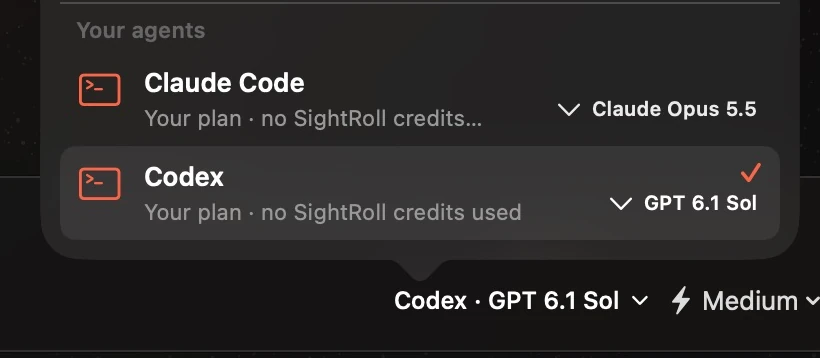
With a licence or any subscription, Claude Code or Codex installed on your Mac can act as Director on your own plan. SightRoll hands it the catalog and deliverable tools over a local connection, and its approvals, questions and sign-in links appear on a card right above the message box. No SightRoll credits are used for its turns.
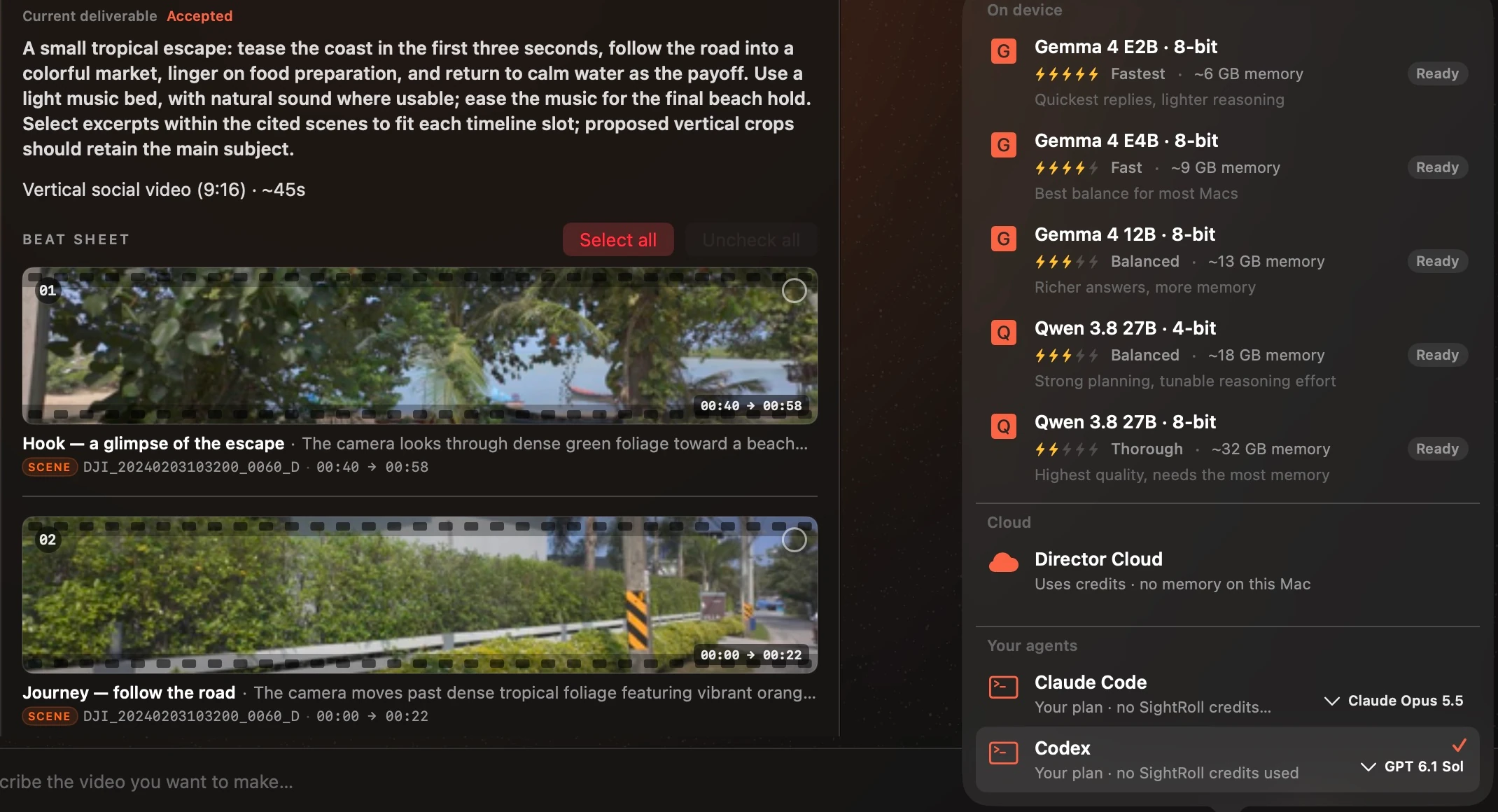
The model menu is a comparison list. Every on-device model shows a five-bolt speed rank, the memory its weights occupy, whether it is downloaded or larger than this Mac allows, and one line on what it is best for — Gemma 4 E2B, E4B and 12B, Qwen 3.8 27B in 4-bit and 8-bit, with Director Cloud beside them.
V2 uses EmbeddingGemma 2 for on-device multimodal retrieval. Indexing, scene detection and selected-frame descriptions run as separate stages across your selected clips. Existing descriptions are indexed in the background. V1 remains available; audio cues are not transcripts and scene boundaries still need review.
For scenes with a published cloud proxy, SightRoll downloads the needed range and cuts it when the original isn’t on this Mac. Each download has its own progress; two run at a time while scenes already on this Mac start cutting straight away. Originals are used whenever they are available, repeat exports reuse the download, and Cancel stops both the export and its downloads.
Pipeline and model choices sit together in the scanner, settings controls share the same treatment, and button colors distinguish default, destructive and approval actions. The full-screen sidebar control and skeleton search loading keep the workspace easier to follow.
Collapse the sidebar to a narrow icon rail with the title-bar button or Control-Command-S. SightRoll remembers your choice. Names appear on hover, approval and loading indicators stay visible, and Chat History or Settings opens at full width over the rail.
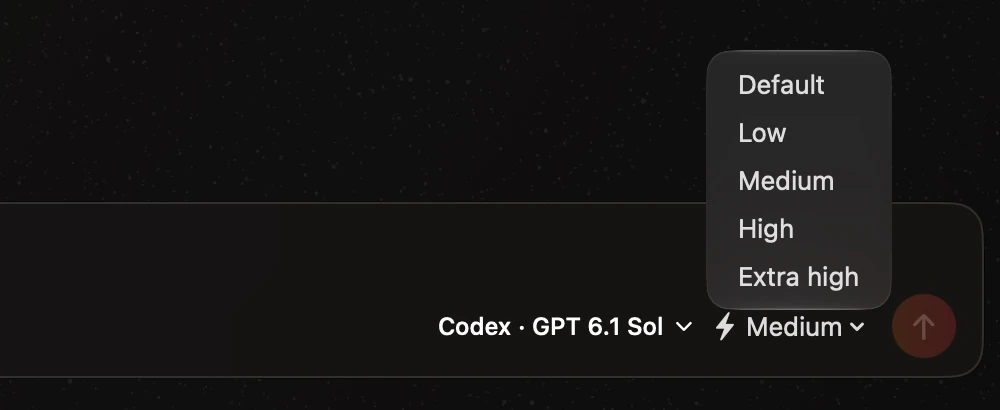
Each chat runs on the engine you picked for it — a local model, Director Cloud, Claude Code or Codex — with that engine’s model and effort. Move a chat to another engine and back, and its agent picks up the same conversation, including what the other engines said in between. When an engine cannot run right now, the chat says why above the message box and never sends on a different one.
Director shows its live reasoning in a collapsible block for local models, Director Cloud and external agents. Expanded thinking grows with the chat instead of scrolling inside a second box. The chat follows new lines until you scroll up, and a completed block keeps its elapsed time after a reload. Retrying a failed reply preserves its text and thinking, with the new answer below it. The context ring reports the external provider’s measured usage and model window.
A beat sheet, script or storyboard can mix clips from your library with shots still to be filmed. Each planned row draws a dashed “To shoot” placeholder with what to record, and a Beats export keeps the gap: a marker file for the planned beat and a stand-in title card of the reserved length, so the timeline keeps its shape in your editor.
SightRoll opens straight into onboarding or the workspace, with no loading screen. Account, licence and trial checks finish behind the window. Models download and prepare when a scan or chat needs them, with visible progress and a way to stop. The window reopens at its saved size, and launch no longer interrupts you with a macOS keychain dialog.
Five moments from these releases — each one a job that used to be done carefully by hand, or not at all.
Editor who already pays for Claude CodeDirector on your own plan
Your agent. Your plan.
Your footage.
Plenty of editors already have an agent they trust and a plan they already pay for. Until now SightRoll could not use it: Director was either the model on this Mac or SightRoll’s own cloud, and everything the agent knew how to do was a copy-paste away.
Turn on External Agents and SightRoll launches Claude Code or Codex on your Mac as Director. It receives the catalog search, scene inspection and deliverable tools over a local connection, delivers each story of a plan in order, and revises from the accepted result rather than from memory. When it needs your permission, wants to ask something, or has to sign in, the request appears on a card right above the message box: Return allows once, Command-Return allows for this chat where the provider can grant that, Esc denies. A request waiting on you never times the turn out.
The consent says exactly what leaves the Mac. Your requests and the clip titles, descriptions and scene notes the agent asks for go to its provider under your plan. Video files stay. Frames go only if you switch that on separately, and only for clips SightRoll has not analyzed. Usage counts are pseudonymous and can be switched off. No SightRoll credits are used for any of it.
Before
Director ran on the model on this Mac or on SightRoll’s cloud credits. If you already paid for Claude Code or Codex, none of its reach helped you, and its permission prompts and sign-ins lived in other windows.
With SightRoll
Claude Code or Codex acts as Director with SightRoll’s catalog and deliverable tools, on your plan. Approvals, questions and sign-in links appear on a card above the message box, and no credits are spent.
Editor on a 16 GB MacWhich model will actually load?
Speed, memory, fit.
Then pick.
Choosing a local model is a trade between speed, quality and memory, and the old menu showed none of the three. You picked a name, waited for a download, and sometimes discovered that this Mac could not hold the weights at all.
The Director model is now chosen from a comparison list. Gemma 4 E2B, E4B and 12B in 8-bit and Qwen 3.8 27B in 4-bit and 8-bit each show a speed rank, their memory footprint, their download state and one line on what they are best for, with Director Cloud alongside. Qwen and the agents get a reasoning-effort control, and the context ring is measured from this Mac’s memory and the prepared prompt rather than a fixed number.
Underneath, models are admitted against Metal’s real working set instead of a double-counted estimate, so a bounded context is still offered under normal pressure and shrinks only when memory is genuinely tight. Switching models releases the idle one first.
Before
The model menu was a list of names. Whether a model fit in memory, was already downloaded, or was the right trade for a quick answer was something you found out after choosing it.
With SightRoll
Each model shows a five-bolt speed rank, the memory its weights occupy, whether it is downloaded or larger than this Mac allows, and what it is best for. The library scan opens the same list with the recommended model marked.
Editor running two briefs at onceOne chat on Codex, one on device
Two chats. Two engines.
No crosstalk.
A Director chat is a piece of work with a particular tool behind it. Switching that tool for one brief should not quietly switch it for the three others you have open, and a chat that cannot send right now should tell you rather than lose what you typed.
Every chat now keeps its own engine, with that engine’s model and effort. A new chat starts on whatever you picked last; a chat that has sent a message keeps the engine it sent on. Move a chat to another engine and back and its agent picks up the same conversation, including what the other engines said in the meantime. Claude Code and Codex run side by side, and changing one chat’s model restarts only that chat’s agent.
When a chat’s engine cannot run — an agent not installed or signed in, Director Cloud while signed out, a model this version does not know — the chat says why above the message box, offers another engine or the right Settings page, and sends nothing anywhere else. Messages it cannot send return to the message box with their attached clips.
Before
Picking an engine changed every chat, starting one agent stopped the other, and a message a chat could not send simply vanished.
With SightRoll
Each chat keeps its own engine, model and effort. Agents run side by side, a chat moved between engines hands the whole conversation over, and a message that cannot be sent comes back to the message box with its clips.
Producer with half the footage shotA beat sheet with three scenes still to film
Plan the whole cut.
Shoot the rest later.
Real projects are planned before they are fully shot. A beat sheet that can only reference footage you already have forces you to keep the missing scenes somewhere else, and to reconcile the two by hand when the last day of shooting is done.
A beat sheet, script or storyboard can now mix library clips with shots still to be filmed. Each planned row draws a dashed placeholder where the thumbnail would be, marked “To shoot” with what to record, and cannot be selected for export because there is no clip to select yet.
Exporting a Beats project keeps those gaps. Every planned beat gets a marker file numbered like the footage links, recording its label, what to shoot and the length the cut reserves, plus a generated stand-in title card of that length in the same container, codec and bit depth as the rest, linked at the beat’s position so the timeline keeps its shape in your editor. The completion sheet lists the beats still to shoot.
Before
A beat with no matching clip was either dropped or quietly filled with something adjacent, and an export closed the gap as if the shot had never been planned.
With SightRoll
Planned rows draw a dashed “To shoot” placeholder with what to record. An export keeps the gap with a marker file per planned beat and a stand-in title card of the reserved length.
Editor reopening the workspaceGet to work before models load
Open the window.
Get to work.
SightRoll opens straight into onboarding or the workspace, with no loading screen. Launch no longer downloads or loads models, or waits for the account, licence and trial checks. Those checks finish behind the open window, and credentials are read without a macOS keychain prompt.
A scan downloads the models it needs before its first clip, with progress in the scan bar and a Stop action that cancels the download. Director downloads a missing model in the composer before preparing the chat. A failed download explains why and offers Retry. Imports started from the menu bar prepare their models too, even with no window open.
The workspace reopens at its saved frame; a first launch opens compact and centred. Account identity waits until the session is known, so a slow sign-in read cannot silently re-key a signed-in catalog. Only one app copy runs at a time, keeping older installed copies from competing with the current workspace.
Before
Opening SightRoll could wait for model downloads, model loading and account checks before showing the workspace. Older credentials could also trigger keychain prompts, and the loading window sometimes filled the display.
With SightRoll
SightRoll opens straight into onboarding or the workspace. Account checks finish behind the open window; model downloads and preparation happen when a scan or chat needs them, with visible progress and cancellation.
36 fixes and refinements: fewer interruptions, clearer progress and a catalog Director can trust, alongside the earlier chat, sync and model improvements.
Update checks at launch and while running
With automatic checks enabled, SightRoll checks when it opens and daily while running. The automatic-check opt-out remains available.
Start with the folders you choose
The scanner starts empty. It no longer preselects a folder from the first catalog clip; add the folders you want to analyze.
Processing progress names the work
V2 shows the current file, processing stage, progress and estimated remaining time, with preview frames during description work.
Search uses skeleton loading
Library search keeps its layout with skeleton placeholders while results prepare. Settings controls and action buttons share consistent shapes and semantic colors.
Cloud scenes reach the export
A scene whose original isn’t on this Mac no longer stalls on a proxy-not-downloaded error. SightRoll downloads that scene’s range from its cloud proxy, shows progress and cuts it. Repeat exports reuse the download; an available original is always preferred.
Cancel stops the whole export
Cancel in the Export window now stops the export and its cloud downloads, including exports started from the Library scene grid.
One warm button style
Default actions share a rounded rectangle, border and label treatment. Destructive actions use red; approvals use green. Main calls to action retain their stronger emphasis.
Folder setup is easier to scan
The folder-picker path and buttons use the card’s full width, without the large leading icon. Folder actions show folder or play icons, size analysis shows a ruler, and onboarding’s trial line shows a gift. Folder guidance and the Force re-analyze hint are shorter.
Starting points and header spacing line up
Director’s starting-point cards share one height even when descriptions wrap. Analyze Folder has matching 14-point gaps above it and to the right, without making the Library header taller.
Retries keep the thinking
Retrying a failed Director reply keeps its text and thinking in place, then answers in a new reply below it. Thinking cut short by the model’s length limit stays visible when the step retries too.
Models match your Codex
The Codex picker lists the models your installed version offers and picks up new choices after an update. Older Codex versions without a model list retain the two built-in choices.
Local chats get past the first message
A large local model that has just loaded gets a few seconds for memory to settle, instead of immediately rejecting the first message because the prepared request exceeds its context window.
Identity conflicts get a clear answer
Director explains conflicting clip identity records in scripts, storyboards and content plans as well as beat sheets, and refuses bare filenames for those clips instead of reporting them as unresolved references.
Sidebar controls line up
The sidebar button aligns with the window buttons. The collapsed rail leaves the same gap on both sides of the traffic lights and follows wherever macOS draws them.
Clip references resolve again
Clips whose identities switched between signed-out and signed-in keys resolve in Director again. Genuine identity conflicts are withheld from results and reported as a catalog problem.
Signed-in clip identity stays put
A session that cannot be read at launch is no longer treated as a sign-out. Clip identities change only when you explicitly sign in or out; new clips wait until the account is known.
One app copy at a time
Opening another copy brings the running app forward instead of starting a competing workspace. Older installed copies cannot run alongside the current one.
Model downloads stay intentional
Typing an @-mention never downloads the search model. Suggestions use word matches until the weights are on disk; preparing or sending a chat downloads the model with visible progress.
Menu-bar imports prepare models
Imports started without a window download their models before the first clip. The menu bar shows progress, Stop cancels, and a failed download leaves imported clips ready to retry.
No empty search suggestions
The Library search field no longer opens an empty macOS AutoFill panel when it first receives focus.
Updates show what you missed
The update dialog lists every release since the version you are running, newest first, rather than showing only the latest release.
Clip results without holes
Two copies of one video no longer leave an empty slot beside a single card. Each video appears once, live and on reopen, and the count matches.
Unfinished chats stay in history
A chat you leave while it is still answering stays listed. A message sent while the local model is still loading is kept, not lost.
Code stays code
Fenced command output, code and JSON in a Director reply survive rendering and Copy. Only legacy beat-sheet payloads are hidden.
Deleting a chat deletes its files
Deletion waits for the chat’s agents in every window, commits the database change, then removes its working files without following links.
Shorter drafts get rebuilt
A draft under the requested length is told which inspected scenes it left out. A shorter story is accepted only when every beat cites an exact range and the shortfall is disclosed.
Streaming that lets you read
Expanded thinking grows with the chat instead of scrolling inside itself. New lines are followed while you are at the bottom; scroll up and your place is kept. Thumbnails arriving later do not move it.
Questions in your language
Director asks metadata questions in the language of the request, and reasoning and deliverable text stay in it.
Cold starts have a deadline
Reading a request times out after two minutes on device and thirty seconds on cloud, and Stop takes effect immediately while it is pending.
Approval cards say what they need
Cards distinguish input to a running command from a form, mark which fields are required, and keep the grant terms pinned while details scroll.
Sync key asked once per session
Catalog-sync keychain reads are cached for the signed-in session, a refused grant is remembered, and Settings offers an explicit Unlock Cloud Sync.
Drive suggestions skip disk images
Automatic drive-scan suggestions exclude disk images and system mounts while camera cards and external drives remain.
Release builds only, content-free
Only release-stamped builds report crashes, and what they send carries no clip references, file paths, folder names, search queries or prompts.
Qwen 3.8 on device
Qwen 3.8 and DFlash2 runtime support, a KV cache trim that no longer corrupts the ring, and weight loading that stays off Swift’s cooperative threads.
Idle sync leaves the menu bar
The menu bar hides idle sync status and keeps active progress, errors and Sync Now.
Popover rows line up
Agents in the engine popover share the model rows’ columns, the onboarding engine cards share one height, and glass panels read as a darker layer, never a lighter one.
Ready to try v0.15.9-beta?